Creating instances
We saw diagrams of complex game-state instances like a deck of cards and a Tic Tac Toe board in the first section of this unit, but we didn't explain how the instances were created. In this section you will learn how to create your game-state instances.
The new operator
When your game program begins, the game state does not exist. You need to create it, instance by instance. To create an instance, you use the new operator. To create an instance of a class type, use this form:
new class-name()
Here's how we would create an instance of the Dice class:
Dice dice;
dice = new Dice();
After the first statement the dice variable exists, but it's value is null, which is a built-in value in Java, and means that there is no instance associated with the variable. You can assign null to any reference variable. The second statement creates an instance of the dice class and assigns it to dice. After these statements execute, this what the memory picture looks like:
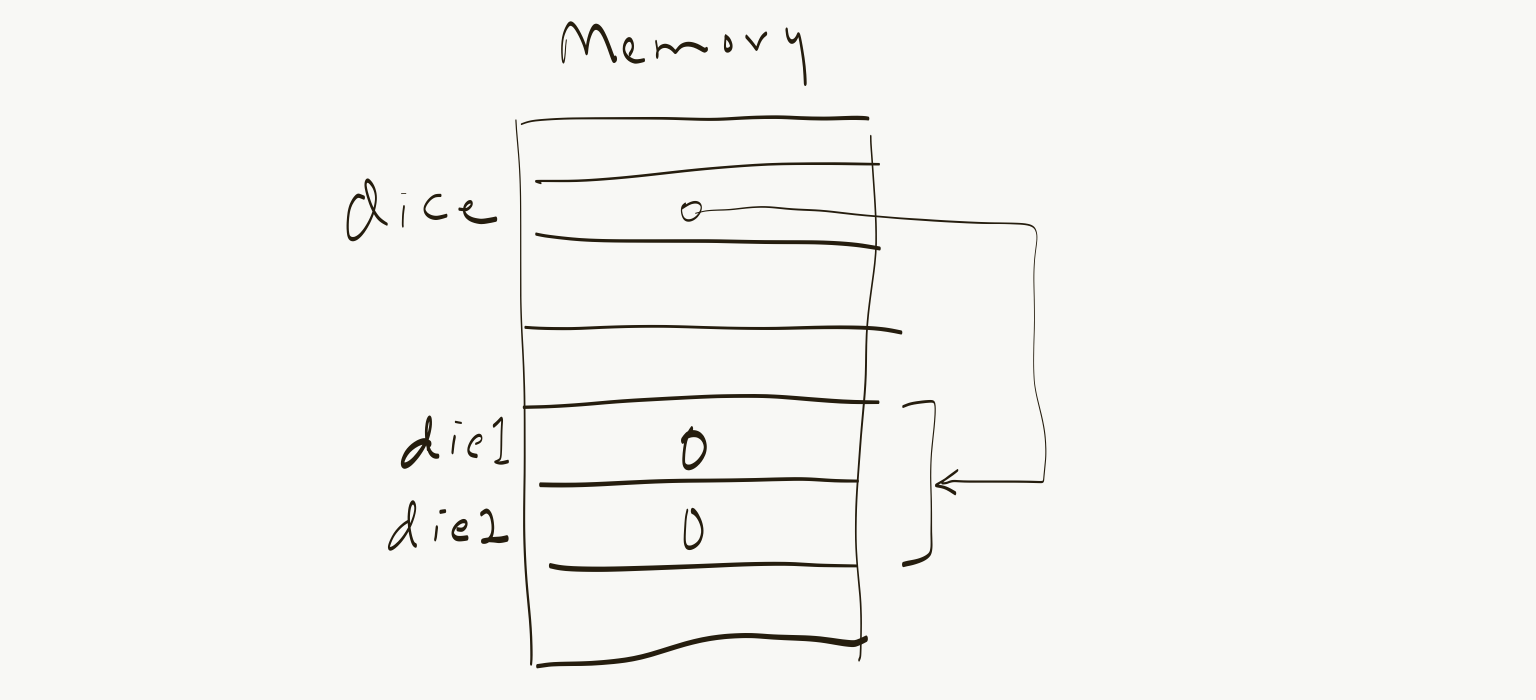
dice.die1 and dice.die2 have the value 0 because that is the default initial value for ints. Suppose we then wanted to assign the values 3 and 4 to the dice. We could do that with these statements:
dice.die1 = 3;
dice.die2 = 4;
Recall that LHS of an assignment statement names an instance that will receive the value expressed by the RHS. In this case the names on the LHS of the assignment statements name ints, the die1 and die2 fields of the dice variable.
If we wanted to copy the value of the die1 field of dice to the die2 field, we could do this:
dice.die2 = dice.die1;
It's important to understand the meanings of the LHS and RHS of this statement. The RHS refers to the value of the dice.die1 field; the LHS refers to the storage location named by dice.die2. This is what will receive the value of dice.die1.
To create an instance of an array type, use this form:
new type-name[size]
…where type-name can either be a class name, one of the primitive types, or an enumerated type.
When you create an array, you need to specify how big of an array you need. So if you need an array of five dice, you can do it like this:
Dice[] yahtzeDice;
yahtzeDice = new Dice[5];
Like class instances, an instance of an array type is also called an object.
Example: Rush Hour
For this section let's use the game-state model for the Rush Hour game that we saw earlier in the Data Models – Examples section:
class RushHour {
   Vehicle[] vehicles;
   int exitingVehicle;
}

class Vehicle {
   Orientation orientation;
   int length;
   Position position;
}

enum Orientation { Horizontal, Vertical }

class Position {
   int row;
   int col;
}
We will create the instance corresponding to the “Beginner” game-state shown in this picture:
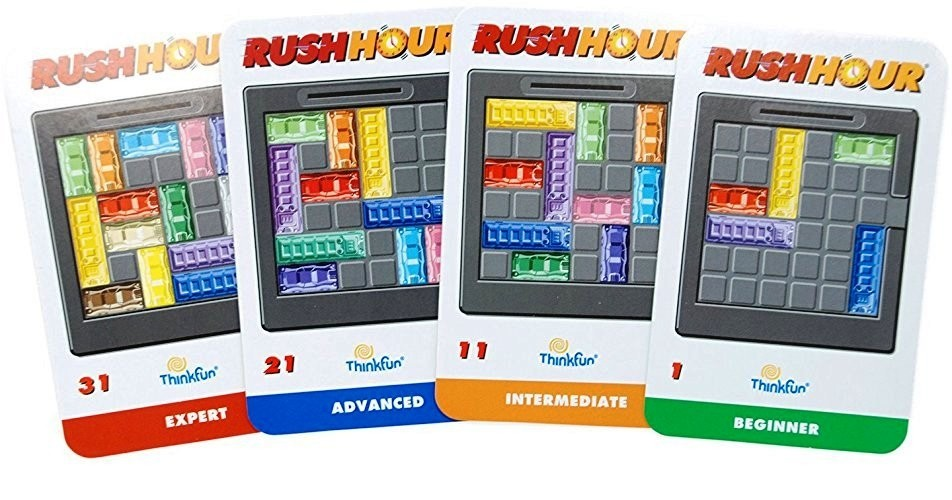
Each instance of the Vehicle class has a row/column position. The rows will be numbered from top to bottom, beginning with 0 (zero), and the columns will be numbered from left to right, also beginning with 0. Why 0? As you will find out when you start doing calculations with rows and columns, such as when calculating positions of the vehicles, the calculations are somewhat neater if numbering begins at 0, because array indexes begin at 0.
The first step is to declare the variable that will hold the root game-state instance:
RushHour rushHourGame;
Then we create an instance of the RushHour class using the new operator:
rushHourGame = new RushHour();
Then we need to create each of the vehicles. However, before we can create the individual vehicles, we need to create the array that will hold them. We again use the new operator, but when creating an array, we need to specify how big of an array we want. For the Beginner card shown in Figure Rush Hour, we need five vehicles.
rushHourGame.vehicles = new Vehicle[5];
Now we can create create Vehicle instances and assign them to the elements of the vehicles array.It doesn't matter what order we create them in, but we'll begin with the red one.
rushHourGame.vehicles[0] = new Vehicle();
Now we can assign values to each field of the newly created Vehicle instance:
rushHourGame.vehicles[0].orientation = Orientation.Horizontal;
rushHourGame.vehicles[0].length = 2;

// row and column go inside a Position object, which we need to create first.

rushHourGame.vehicles[0].position = new Position();

// we choose to represent the position of a vehicle as the location of its top-left end.

rushHourGame.vehicles[0].position.row = 2;
rushHourGame.vehicles[0].position.col = 0;
Now we will do the same for the remaining four vehicles. But to save some typing (and avoid potential mistakes), we'll do it somewhat differently. We'll create a new Vehicle but save a reference to it in a variable. When we are done setting it up, we will assign it to its position in the array.
Vehicle v;
// create the yellow truck
v = new Vehicle();
v.orientation = Orientation.Vertical;
v.length = 3;
v.position = new Position();
v.position.row = 0;
v.position.col = 2;
rushHourGame.vehicles[1] = v;

// create the green car
v = new Vehicle();
v.orientation = Orientation.Horizontal;
v.length = 2;
v.position = new Position();
v.position.row = 2;
v.position.col = 0;
rushHourGame.vehicles[2] = v;

// create the blue truck
v = new Vehicle();
v.orientation = Orientation.Vertical;
v.length = 3;
v.position = new Position();
v.position.row = 2;
v.position.col = 0;
rushHourGame.vehicles[3] = v;

// create the purple truck
v = new Vehicle();
v.orientation = Orientation.Horizontal;
v.length = 3;
v.position = new Position();
v.position.row = 2;
v.position.col = 0;
rushHourGame.vehicles[4] = v;
Now the game state of our Rush Hour game is initialized.