Basic system model
There are a few things we're going to be mentioning a lot in the sections ahead. One is the compiler, and two more are CPU and memory.
The compiler
Java is a high-level programming language. It cannot be run by a computer directly; it needs to be translated into a low-level language called “bytecode” before it can be run. The Java compiler is what does this translation.
If the Java compiler has any problems translating your program, it prints error messages. Unfortunately, these error messages are often not that helpful, and are sometimes misleading. In any case, they reflect that the compiler found something it wasn't expecting. It tells you what it was expecting, and where, approximately, in your code that it found the unexpected thing.
Don't be dismayed if the compiler tells you that your code has many errors. A single missed character can completely throw off the compiler and produce a cascade of errors. Focus only on the first error. Fix that and retry.
Basic system model
To form data structures in a Java program—and that's where we're starting—we need to understand the various kinds of data Java supports. To discuss those kinds of data, it will help to have a simple model of a computer system in mind.
Our basic system model consists (for now) of two components: CPU and Memory.
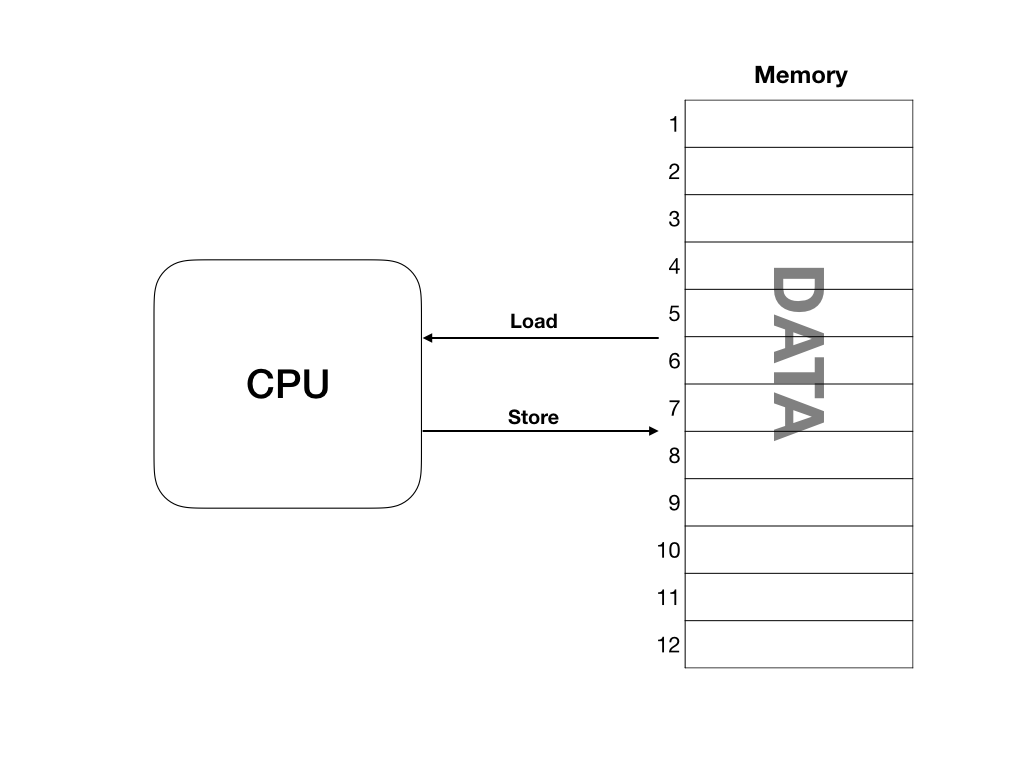
Memory is simply a very large array of storage locations, where each storage location can store one byte (eight bits) of data. Each storage location has a number, or address.
The CPU loads data from the Memory by requesting it from a particular address. Internally, the CPU can store only a little data. It performs operations on this data, such as add, subtract, multiply, divide, and comparing two pieces of data, and then stores data back to Memory, again to particular addresses.
Your readers
Programming is a more social activity than you might think. First, when you learn it, you're typically learning it with others, who may also find it difficult, and so you'll work on assignments together.
Second, if you take a job involving writing software, you'll probably be doing it with others, who will depend on your code, and whose code you will depend on in turn.
Third, you are writing for your successors, people who will inherit your code and who will be updating it to add some feature or make some modification, or perhaps—but let's hope not—to fix a bug. You need to keep these people in mind when you are writing your code. You should strive to make the purpose of any piece of code, and how it accomplishes this purpose, clear to future readers of that code. How to do this will be discussed at the appropriate time. For now, we just wanted to alert you that this is one of your concerns when you program a computer.
If thinking about your successors may seem a little premature to you, then think of future-you as a successor. When you are writing code, it seems quite clear. But you will be surprised to find how quickly that clarity disappears when you return to the code a day or two later.
Documenting your code through comments
When the meaning or purpose of a particular piece of code is not self-evident, then you should add an annotation to the code to explain it. The way you do that is through a comment. A comment is text within your code that you do not want to be interpreted as code. In Java there are two ways to write a comment. For short comments, write a single-line comment:
int NUM_ROWS = 10; // the number of rows in the board
int NUM_COLS = 12; // the number of columns in the board
The // and anything after it are ignored by the compiler. For longer comments, you can write a multi-line comment:
/*
This game follows the rules of Sudoku as described on
www.counton.org/sudoku/rules-of-sudoku.php
The classic Sudoku game involves a grid of 81 squares.
The grid is divided into nine blocks, each containing nine squares.
The rules of the game are simple: each of the nine blocks has to contain all
the numbers 1-9 within its squares. Each number can only appear once in a row,
column or box. The difficulty lies in that each vertical nine-square column,
or horizontal nine-square line across, within the larger square,
must also contain the numbers 1-9, without repetition or omission.
Every puzzle has just one correct solution.
*/
The /* and */, and everything between them, is ignored by the compiler. This makes this form of comment slightly dangerous. If you're not careful, you can comment-out code that you didn't mean to.
There is also a variation on the multi-line comment, called the documentation comment. It brackets the comment with /** ... */, and the /** is recognized by a tool called javadoc, which produces standard documentation for a Java library. We will not be using this form of comment in our text.